Dify Workflow: Apple Notes to Notion
A hybrid local + Dify workflow for migrating Apple Notes to Notion with AI-powered categorization.
Overview
A hybrid local + Dify workflow for automating the migration of Apple Notes to Notion. This tool preserves original note creation dates, handles images and attachments via Dropbox, and uses AI (DeepSeek via Dify) for intelligent categorization.
Why This Exists
Apple Notes lacks the organizational power and cross-platform accessibility of Notion. This workflow enables bulk migration while preserving metadata and intelligently categorizing notes using LLM.
Features
- Metadata Preservation: Maintains original note creation dates from macOS metadata
- Attachment Handling: Uploads images and attachments to Dropbox for embedding in Notion
- AI Categorization: LLM-powered (DeepSeek via Dify) automatic note categorization
- Rate-Limited API: Handles 267+ notes with proper Notion API rate limiting
- Privacy-First: Sensitive files (.gitignore) excluded from version control
Workflow Architecture
Apple Notes (Export) → Markdown Files → Dropbox Upload → Dify AI Processing → Notion Database
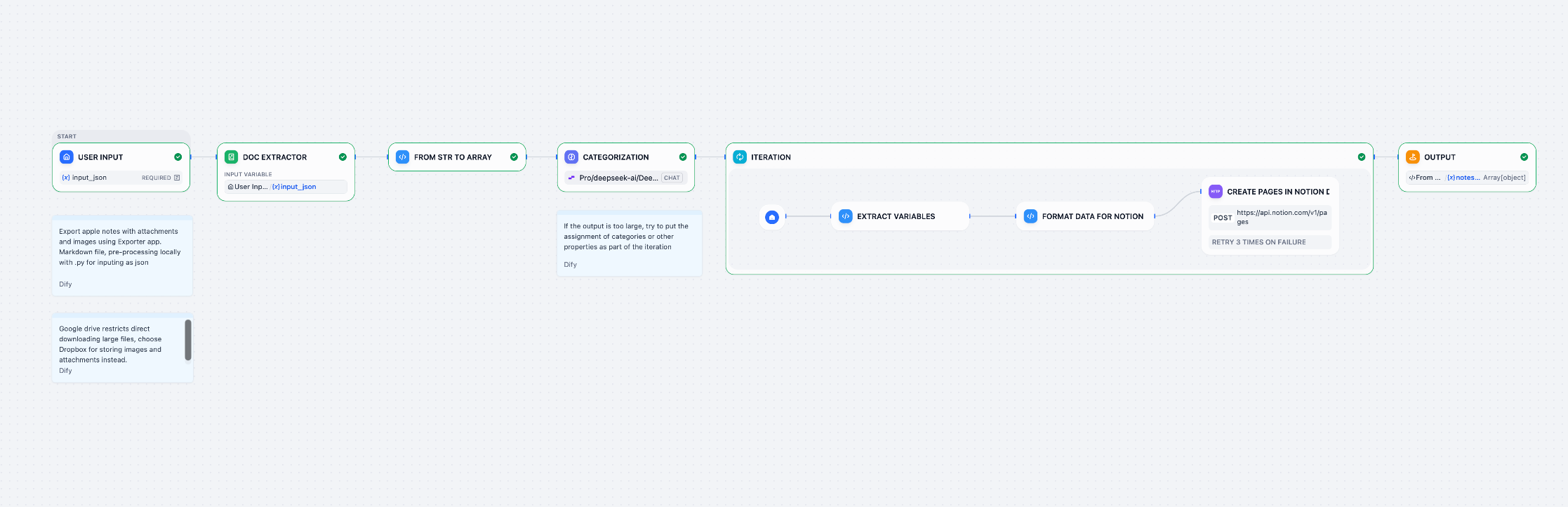
Folder Structure
apple_notes_proj/
├── apple_notes/           # Exported notes (gitignored)
│   ├── *.md
│   ├── images/
│   └── attachments/
├── upload_to_dropbox.py   # Local Dropbox uploader
├── prepare_json.py        # JSON preparation script
├── dify_input.json        # Full dataset for Dify
├── input_test_to_dify.json # Test subset (5 notes)
├── attachment_mapping.json # UUID to Dropbox URL mapping
└── .gitignore             # Excludes personal data
Usage
1. Export Apple Notes
Use Exporter (Mac App Store) to export notes to Markdown format with the expected structure:
apple_notes/*.md- Note filesapple_notes/images/- Image attachmentsapple_notes/attachments/- File attachments
2. Upload Attachments to Dropbox
# Install dependencies
pip install dropbox

# Configure Dropbox
cp upload_to_dropbox.py.example upload_to_dropbox.py
# Edit with your Dropbox access token

# Upload
python3 upload_to_dropbox.py
Creates:
- Dropbox folder
/Apple Notes Attachments - Local
attachment_mapping.json
3. Prepare JSON for Dify
python3 prepare_json.py
Creates:
dify_input.json- Full dataset (267 notes)input_test_to_dify.json- Test subset (5 notes)
4. Process in Dify
- Upload
input_test_to_dify.jsonfor testing - After validation, upload full
dify_input.json - AI categorization using DeepSeek-V3 model
5. Import to Notion
- Sync processed data to Notion database
- Requires
NOTION_TOKENandNOTION_DATABASE_ID
Technical Specifications
- Dify Workflow: View on Dify Cloud
- AI Model: DeepSeek-V3.2 (via Siliconflow)
- Output Format: Structured JSON for Notion API
- Batch Processing: 267+ notes with rate limiting
Files
| File | Purpose |
|---|---|
upload_to_dropbox.py | Uploads attachments to Dropbox |
prepare_json.py | Prepares JSON input for Dify |
AI_summary.md | Detailed Dify workflow configuration |
attachment_mapping.json | Maps UUIDs to Dropbox share URLs |
References
Related
Inspired by Grasshopper (node-based visual scripting for Rhino) - a low-code, node-type workflow tool driven by Python, used for architectural parametric design in undergraduate studies.